How to transcribe audio with an API, from zero to text
Three HTTP requests turn an audio file into text with timestamps. No SDK, no queue to configure, no GPU server to run.
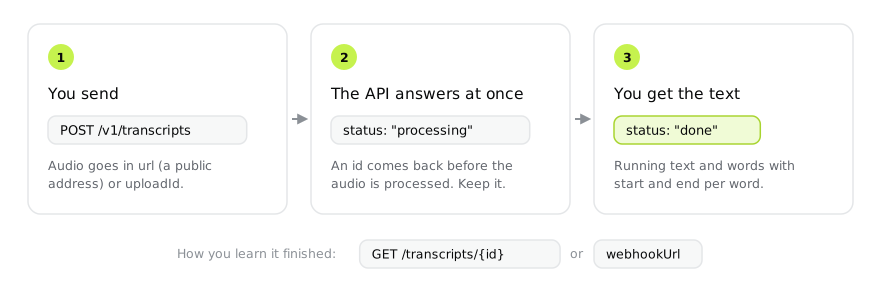
Transcribing audio with an API is simpler than most integrations make it look. It takes three requests: one to create the account and get the key, one to send the audio, one to fetch the text. No SDK, no new dependency in your project, no GPU machine to keep alive.
This post walks the whole path in curl, then covers the three details that
usually bite: audio that is not on a public URL, waiting for the result, and
cost.
1. The key
Create the account and copy the key that comes with it. No credit card, and the
account starts with US$ 2 in credits, enough for roughly 65 hours of audio. The
key goes in the Authorization header on every request:
export TRANSCREVO_API_KEY="your-key"2. Send the audio
If the file already sits on a public URL (a bucket, a CDN, a podcast enclosure), one request is enough:
curl https://api.transcrevo.com/v1/transcripts \
  -H "Authorization: Bearer $TRANSCREVO_API_KEY" \
  -H "Content-Type: application/json" \
  -d '{ "url": "https://example.com/podcast.mp3" }'
The response comes back immediately, before the audio is processed:
{
	"data": {
		"id": "6b9f2b81-1c9a-4f4e-9d5f-8f2a7c1e3b90",
		"status": "processing",
		"text": null,
		"language": null,
		"cost": 0,
		"model": "trv-1",
		"createdAt": "2026-09-01T18:00:00.000Z"
	}
}
Keep the id. That is how you fetch the result.
Audio that is not on a public URL
A local file, or one in a private bucket, goes through upload. The API takes the
whole file in one request, and takes it in chunks when it is large or the network
is bad: a chunked upload resumes where it stopped instead of restarting 800 MB.
Both paths are covered in sending files. Either way you get
an uploadId, which replaces url:
curl https://api.transcrevo.com/v1/transcripts \
  -H "Authorization: Bearer $TRANSCREVO_API_KEY" \
  -H "Content-Type: application/json" \
  -d '{ "uploadId": "upl_9f2b81c9a4f4e9d5" }'
3. Fetch the text
Processing is asynchronous. Poll the id until status turns done:
curl https://api.transcrevo.com/v1/transcripts/6b9f2b81-1c9a-4f4e-9d5f-8f2a7c1e3b90 \
  -H "Authorization: Bearer $TRANSCREVO_API_KEY"
{
"data": {
"id": "6b9f2b81-1c9a-4f4e-9d5f-8f2a7c1e3b90",
"status": "done",
"text": "Bom dia a todos. Vamos começar.",
"words": [
{ "start": 0.32, "end": 0.78, "text": "Bom", "speaker": null },
{ "start": 0.78, "end": 1.04, "text": "dia", "speaker": null }
],
"language": "pt",
"durationSeconds": 3,
"cost": 0.0025,
"currency": "USD"
}
}text is the running transcript. words is what you need for captions, for
search inside a recording, and for cutting video at the exact word: every word
comes back with start and end in decimal seconds.
Do not sit in a polling loop
Polling is fine for one file. At volume it becomes request cost and delay: you
learn it finished on the next tick, not when it finished. Pass webhookUrl on
creation and the API calls you once, when it completes:
curl https://api.transcrevo.com/v1/transcripts \
  -H "Authorization: Bearer $TRANSCREVO_API_KEY" \
  -H "Content-Type: application/json" \
  -d '{
    "url": "https://example.com/podcast.mp3",
    "webhookUrl": "https://your-server.com/hooks/transcrevo"
  }'
The webhook body carries the id and the status, but not text or
words: on a two-hour file those fields run past 10 MB, and a webhook is not
the place for that. When the call arrives, fetch the transcript by id.
The parameters that change the result
Four optional fields account for most of the distance between an integration that works and one that disappoints:
| Field | When to use it |
|---|---|
language | When you already know the language. On short or noisy audio, auto-detection errs more than you would. |
speakers | When you need to know who said what. Changes the rate, does not improve the text. |
glossary | Whenever the audio carries proper nouns, brands or domain jargon. The biggest quality gain per line of code. |
webhookUrl | Whenever there is volume. |
glossary deserves attention. Proper nouns and loanwords are the most common
error of any transcription system, because they are exactly the words missing
from training. You pass what it hears and what it should write:
{
	"url": "https://example.com/meeting.mp3",
	"glossary": { "gatu": "Gatto", "bertual": "Bertuol" }
}
What it costs
US$ 0.03 per hour of audio, billed by the second: two minutes cost US$ 0.001,
not one cent. With speakers, US$ 0.05 per hour. The charge lands when the
transcript turns done, and while it processes cost is 0. The details,
including the automatic discount above 10,000 hours, are in
pricing and limits.
What goes wrong
402 insufficient_balance: credit ran out. Nothing is deleted, and auto top-up exists so this does not happen in the middle of the night.audio_too_long: the limit is 10 hours per file. Split before sending.429 rate_limited: you passed 120 creations per minute. Wait and retry.429 concurrency_limit: while the account runs on the welcome credit only, at most two transcripts process at once. The first top-up lifts the cap.
The full list of codes is in errors.
Summary
One key, one POST with url or uploadId, and one GET (or a webhook) to
pick up the text. Everything else is optional and exists for specific cases:
speakers to know who spoke, glossary to get the names right, language to
stop depending on auto-detection.