What speaker diarization is, and when you need it
Diarization answers "who said what". It is a separate task from transcription, it is billed separately, and it fails in specific places worth knowing before you integrate.
Transcription answers what was said. Diarization answers who said it. They are different tasks solved by different models, which is why turning the second one on changes the rate and does nothing for the first.
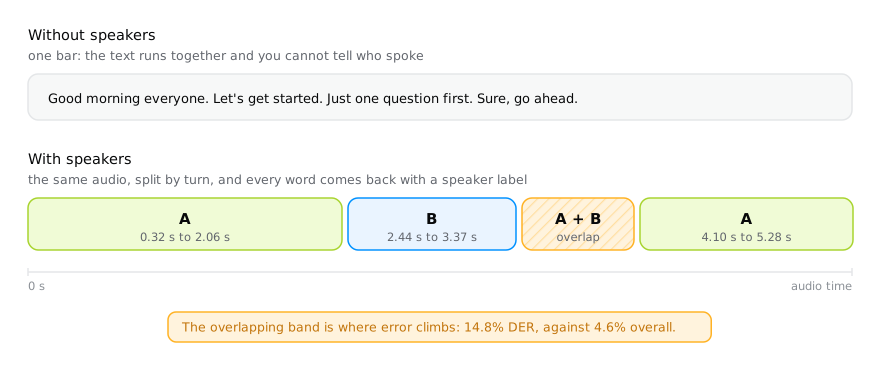
In a five-person meeting, transcription alone returns a block of running text. With diarization, every word comes back with a speaker label:
"words": [
	{ "start": 0.32, "end": 0.78, "text": "Bom", "speaker": "A" },
	{ "start": 0.78, "end": 1.04, "text": "dia", "speaker": "A" },
	{ "start": 2.44, "end": 2.9, "text": "Vamos", "speaker": "B" },
	{ "start": 2.9, "end": 3.37, "text": "começar.", "speaker": "B" }
]
The labels are anonymous by nature: "A" and "B" mean "the first voice" and
"the second voice", not names. Tying a label to a person is your job, and it
normally comes from outside the audio (who joined the room, who was on the
extension).
How to ask for it
A single field decides everything:
| Value | Meaning |
|---|---|
| omitted | Running text, speakers not separated. |
true | Separate speakers; the API works out how many. |
3 | There are exactly 3 speakers. |
"2-5" | There are between 2 and 5 speakers. |
curl https://api.transcrevo.com/v1/transcripts \
  -H "Authorization: Bearer $TRANSCREVO_API_KEY" \
  -H "Content-Type: application/json" \
  -d '{ "url": "https://example.com/meeting.mp3", "speakers": 5 }'
Only give a count when you actually know it. A wrong guess is worse than no
guess: it forces the separation to the number you supplied, so the system starts
splitting one voice in two or merging two into one. If you do not know, true
leaves the decision to whoever is holding the audio.
Where diarization fails
No system is always right, and knowing the holes before you integrate saves debugging time. We measured ours on 216 files, 19.6 hours of speech with human annotation, using the standard DER protocol:
| Metric | Value |
|---|---|
| DER without collar | 4.6% |
| DER with a 0.25 s collar | 2.8% |
| DER on overlapping speech only | 14.8% |
| Exact speaker count | 146 of 216 files |
DER (diarization error rate) is missed speech plus false alarm plus speaker confusion over total speech time. Lower is better.
The two places where it gets worse are predictable:
- Overlapping speech. Two people talking at once get a single label. It is the system's worst slice: 14.8% DER against 4.6% overall.
- Short turns. Below 5 seconds ("yes", "mhm", a quick question), speaker accuracy drops to the 59 to 75% range. Above 15 seconds it sits between 95 and 99%.
That has a practical consequence: if your product depends on counting short interventions (who interrupted whom, how many times each person spoke), expect errors in that slice. If it depends on reasonable blocks of speech (meeting minutes, interviews, two-person podcasts), diarization delivers.
The full breakdown, with JER, missed speech and false alarm separated, is in accuracy and quality.
When not to use it
Diarization costs more: US$ 0.05 per hour of audio against US$ 0.03 for plain transcription. It does not make the text better. So:
- Do not use it for a lecture, a dictation, a voice note, a video with a single narrator. One speaker has nothing to separate.
- Do not use it "just in case" on a large batch. On a thousand-hour queue, the difference between the two rates is US$ 20.
- Use it when the label reaches the product: meeting minutes, interviews, support calls with a customer and an agent, captions that must identify who is speaking.
The speakerCount field
With speakers, the response carries speakerCount, how many distinct voices
were found. The difference between null and 0 matters: null means "you did
not ask", 0 means "I looked and nobody was speaking". Treating them alike
hides the silent file, which is exactly the case you want to see in the log.